
_edited.png)


Cúl Camps
2026
Cúl Camps
2026
GAA Cúl Camps are a key part of the Gaelic Games calendar, offering children an exciting and inclusive introduction to football, hurling, camogie, handball and rounders. Designed for boys and girls aged 6–13, Cúl Camps provide a fun, safe and engaging environment where participation and enjoyment are at the heart of every activity.
Recognising that the role of Cúl Camp Co-ordinator can be overwhelming, we have dedicated this page to provide as much help as possible to assist in creating a positive and successful Cúl Camp.
You will find useful pdfs of checklists etc as well as coaching resources which can also be accessed on the
Camp Co-ordinator Guide to the
Cúl Camp Website
If you’re working as a camp co-ordinator for a Gaelic Athletic Association Cúl Camp, the Kellogg's GAA Cúl Camps website is your main hub for registrations, attendance, and admin. Here’s a practical, no-nonsense guide to navigating it efficiently.
As camp Co-ordinator, you will need to provide your contact details to your club to be sent to the County board to register you for the site.
When you open the website, scroll right to the bottom of the page. In small print you will find a tab labelled Co-ordinator, click on this and it will open your login ; sign in using the email login you provided to your club as camp co-ordinator or to your county board.
If this is your first time logging in you may need to do a password reset.
If you dont receive your password reset after a few mins, try a 2nd time. If you have still not received a password reset in your email, check your spam folder & then check with your club to make sure the correct email address was sent to the county board.
1. Logging In
-
Go to the official Cúl Camps site, linked above.
-
Use the login credentials provided to your county board or GAA admin.
-
If it’s your first time, you’ll likely need to set a password via email.
👉 Tip: Bookmark the login page—you’ll use it daily during camp season.

2. Dashboard
Once logged in, you’ll land on your dashboard. This is your control center:
-
Camp Details: Dates, venue, and your assigned camp
-
Participant List: All registered children
-
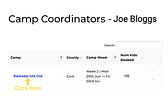
When you select your camp you will be able to see who has booked into your camp and the number of children registered.

3. Managing Participants
This is where you’ll spend most of your time.
-
View Registrations
See all children signed up, including age, medical notes, and emergency contacts. -
Check-in / Attendance
Mark daily attendance—some camps require digital check-in.
👉 Tip: Double-check medical notes before Day 1—don’t leave that until the morning rush.
4. Reports & Admin
-
Generate attendance reports
-
Click on your camp to see participants.
-
There will be a button to Download CSV
-
This will generate an excel sheet of all your participants and will include emergency contacts etc.
-
If you download your excel sheet in advance of your camp, please make sure you check registration again each day in the week before camp in case any additional participations are added near your camp date.
-
Cúl Camps require submission of reports at the end of the week

5. Common Issues
-
Can’t see your camp?
You may not be assigned correctly—contact county admin. -
Missing participant info?
Parents sometimes omit details—flag it early. -
Login problems?
Use password reset or escalate to GAA support.
6. Device Use
The site works on phones, but:
-
Desktop/laptop is far easier for bulk tasks
-
Use mobile mainly for quick attendance checks
-
The system isn’t always intuitive. The trick is:
-
Log in early (days before camp starts)
-
Familiarize yourself with lists and reports
-
Don’t wait until Day 1 to figure things out
7. Co-ordinator Menu
When you have logged in on a laptop you will be presented with a menu with various links available

8. links
-
Camps will link you to any Cúl Camps which you are registered to Co-ordinate.
-
Email to all Parents; This is useful for setting up Parent whats app groups for sending information. Or for sending any information which may be too long for whats app messages. This email will go to all emails usedf to register children to your camp.
9. Tools & Utilities
-
Announcements. In here you will find "notices" from Cúl Camps with tips and timeslines.
-
Report an incident; This is a quick access link for serious incidents /accidents that may occur at your camp. Familliarise yourself with this form in advance.
-
Start a cash Booking. In the event of your registration being closed and you have a short notice request to register, you can accept a cash booking but it is complusory to use this link to register the child to be covered with insurance.
-
Bulk Upload allows you to record multiple. Only use bulk upload if you actually need it. For a handful of late kids, manual entry is often quicker and safer. Bulk upload is most useful when you’re dealing with 10+ entries at once.
10. Help
-
Can’t see your camp?
You may not be assigned correctly—contact county admin. -
Missing participant info?
Parents sometimes omit details—flag it early. -
Login problems?
Use password reset or escalate to GAA support.

-
You will find how to videos which you may find useful

-
Useful links tab takes you to all of the Cúl Camps forms, including Camp checklist, epi pen permission, early collection forms etc.
Quick links
Links to all resources are available on the Cúl Camp website, however these are some quick links to the most used documents/forms.
Click on each image to open the document in full.
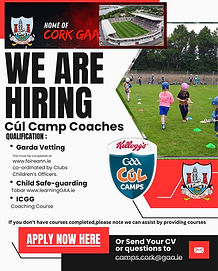

GAA CAMP
POLICY

BECOME A COACH
SAFE-GUARDING FOR 16-18YRS

CHECKLIST
Steps in Preparing to Host a Cúl Camp
Hosting a successful Cúl Camp takes planning, coordination and a strong focus on creating a positive experience for children. The following steps outline best practice for clubs:

1.
SECURE APPROVAL & DATES
Begin by applying through the official Gaelic Athletic Association (GAA) system and agree camp dates with your County Board. Avoid clashes with other local events and confirm pitch availability early.

2.
APPOINT CAMP
CO-ORDINATOR
Assign a dedicated coordinator to oversee organisation. This person acts as the main link between the club, county coaching staff and Kellogg’s GAA Cúl Camps administration.
3.
CONFIRM FACILITIES & EQUIPMENT
Ensure your grounds are fully prepared:
-
Book your Pitch
-
Safe, well-marked pitches
-
Access to toilets and changing areas
-
Indoor space (if possible) for wet weather
-
Adequate equipment (footballs, sliotars, cones, bibs)
-
Carry out a basic risk assessment to ensure a safe environment.
4.
RECRUIT & VET COACHES
All coaches should:
-
Be Garda vetted
-
Have completed safeguarding training
-
Ideally hold a foundation-level GAA coaching qualification
-
Aim for a strong coach-to-child ratio to maximise participation and enjoyment.
5.
PLAN THE COACHING PROGRAMME
Structure each day around:
-
Fun warm-ups and icebreakers
-
Skill development stations (kicking, striking, catching, movement)
-
Small-sided games
Follow GAA coaching principles—maximum activity, inclusivity, and game-based learning.
6.
PROMOTE THE CAMP
Advertise through:
-
Club social media channels
-
Local schools
-
Community noticeboards
-
Highlight key details: dates, age groups, cost, and how to register (usually via the official Cúl Camps website).
7.
ORGANISE REGISTRATION AND ADMINISTRATION
Keep clear records of:
-
Participant details
-
Medical information
-
Emergency contacts
-
Prepare sign-in/sign-out procedures for each day.
8.
PREPARE FOR SAFE-GUARDING & WELFARE
Follow GAA safeguarding guidelines:
-
Designate a Children’s Officer
-
Ensure clear supervision at all times
-
Have first aid and emergency procedures in place
-
Child welfare must always be the top priority.
9.
FINAL CHECKS BEFORE CAMP WEEK
-
Confirm coach availability
-
Prepare equipment packs
-
Review daily schedules
-
Monitor weather and contingency plans
-
Check permission to allow photos for social media etc on registration. Often parents select no by mistake. Your email parents to ask if they allow photos to be taken.
10.
DELIVER
& REVIEW
During the camp:
-
Keep sessions fun, active and inclusive
-
Support less confident children
-
Communicate with parents
Afterwards:
-
Gather feedback from coaches, parents and children
-
Identify improvements for next year
Cúl Camp Forms
Select each form to open a pdf and download it to save it and use it later or print it off.
Printing or editing forms etc is best done from a laptop, however they can be viewed on a mobile device.

credit GAA Cúl Camps
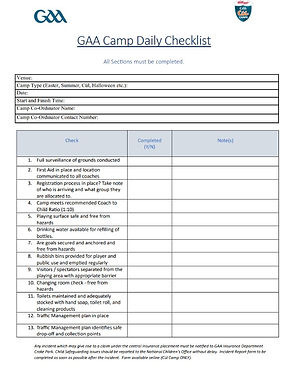
credit GAA Cúl Camps

credit GAA Cúl Camps

credit GAA Cúl Camps

credit GAA Cúl Camps
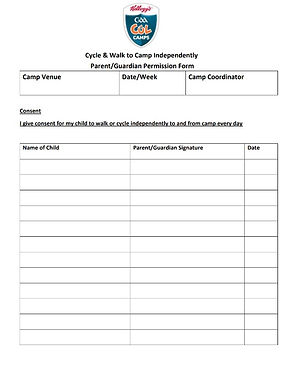
credit GAA Cúl Camps

credit GAA Cúl Camps
PLEASE NOTE
To use a document and enable editing on top of the document;
-
Open the file
-
Download it & Save it.
-
Select the pdf on the document
-
In format in the top menu select WRAP
-
SELECT WRAP BEHIND TEXT
-
You can now edit anywhere on top of the pdf
Additional useful templates to download and edit
How to use these forms:
-
Click the image to open the document
-
Select Download (or File → Save As)
-
Save a copy to your device
-
Open the file in Microsoft Word
-
Complete and edit your own version as needed
Note: The original file cannot be edited—please download your own copy before making changes.
-
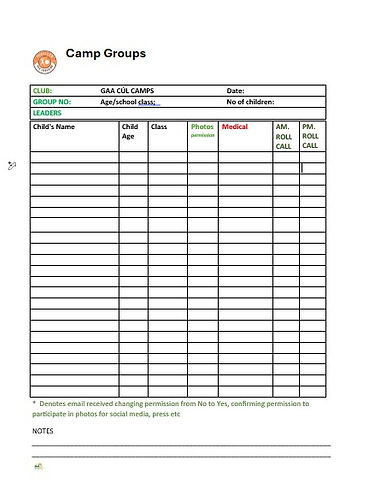
Remember to print Check in sheets & Group sheets for each day of your camp.
-
You can copy and paste registered children into the template provided here.
-
When you download your registration list from the Cúl Camp website, you can use the excel provided to you directly, however you need to organise it for quick and accurate check in and check out of all children.

-
✅ Simple steps
-
Open your Excel file, delete any irrelevant data for your camp check in list. eg. the column containing gear sizes.
-
Highlight your data
-
Click and drag over all columns (names, contact details, etc.)
👉 Important: include everything so rows stay together -
Go to the “Data” tab (top menu)
-
Click “Sort”
(or use A–Z button for a quick sort) -
In the sort box:
-
Column: Choose the column with names (e.g. Surname or First Name)
-
Order: Select A to Z
-
Click OK
-
⚠️ Important tips
-
If prompted, choose “Expand the selection” so all data stays aligned
-
Sorting by Surname is usually best for registration lists
-
Make sure there are no blank rows in the middle
-
👍 Quick shortcut
-
If your data is clean:
-
Click anywhere in the name column
-
Press the A–Z sort button in the Data tab
How to sort your registration list
-
Now is the time to ensure all the information you have received is correct. eg. the class that the child is attending in Sept. This is often incorrect and results in the children being in the wrong group.
-
When your registration is closed, send an email to parents asking to confirm the class their child is attending in Sept and to reconfirm that they will allow photos to be taken for social media, local press etc.
-
As per GDPR guidelines all registration information should not be retained at the conclusion of your camp. ensure all information is destroyed safely.
-
As per GDPR guidelines information is not to be used for any other purpose other than the running of your camp.
Child Safety & your forms
Child safety at your camp is of the utmost priorty.
-
Ensure your check in & checkout sheets are ready and correct. No child is to be allowed to leave the camp without a parent/guardian checking them out.
-
If a child is to walk home or cycle home without a parent, ensure the permission form is filled in and signed in advance of your camp.
-
When preparing your registration sheets for each day, ensure you take note of medical information regarding the child in your care. Ensure that this is also put on the group sheet so the Group leaders are aware of the medical conditions of any child in their group.
-
Ensure that your coaches convey any issues with children in their group directly to you so you can address it and record if necessary
-
No one present at camp except for the Co-ordinator & visiting local press photographer is permitted to take any photos of any children at camp, even if the permission for photos has been granted.
-
Ensure if photos are being taken that they do not include any child where permission has not been granted on your registration or by email from parent or guardian.
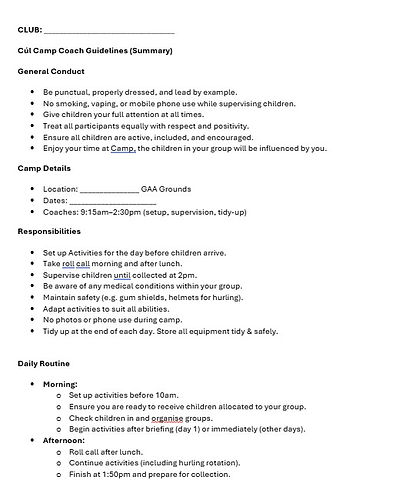
Cul Camp Coach Guidelines
This printable template can be downloaded and edited to personalise it to your individual camp.
You can highlight areas of special importance within your camp for coaches and ensure that any questions from coaches are addressed in advance of camp.
As with other forms above, tap the image to access the downloadable file.
Camp Daily Schedule
-
Planning your daily schedule is so important to establish a routine but to also ensure that each group experiences a fun and varied camp.
-
Below is a suggested schedule for you to consider as a guide. Tap on either image below to open a word document wich can be downloaded saved. These are PDFs so cannot be altered but you may overwrite with text by moving the cursor on your screen or print and write you Coaches names to the Activities & Groups.
-
A suggestion would be to allocate a coach & helper per group and name these in your Zones.
-
Each Zone therefore has 2 coaches & 2 helpers.
-
Each morning, these 4 people set up all of their allocated 4 activities of the day, within their allocated zones before camp commences to maximise time throughout the day. Do not waste time setting up activities throughout the day. Keep the children engaged.
-
Zones are colour coded to both pages.
-
The Function of the zone is as follows eg. Zone 3 following the schedule on page 1.
-
Group 5 completes Activity 1, while group 6 completes Activity 2
-
Group 5 & 6 swap activities; Group 5 Activity 2 ; Group 6 Activity 1
-
Group 5 completes Activity 3 while Group 6 completes Activity 4
-
Group 5 & 6 swap activities; Group 5 Activity 4; Group 6 Activity 3
-
Small sided games to finish each day.
-
-
A suggestion with this plan would be to assign the coaches to the specific Activities, whilst the Helper or 2nd coach moves with the group to the next Activity.
-
Group 5 ; Coach A & Coach B
-
Coach A runs Activities 1 & 3 Coach B moves with Group 5
-
-
Group 6 ; Coach C & Coach D
-
Coach C runs Activities 2 & 4 Coach D moves with Group 6
-
-


Select Camp activities to view

credit GAA Cúl Camps

credit GAA Cúl Camps